GRAYESS IRT Cronista uses a cloud-based licensing system. Your software license includes an Installation Key in the following format:
XXXXXX-XXXXXX-XXXXXX-XXXXXX-XXXXXX-XXXXXX-XXXXXX.
The key identifies your license in the licensing database. Depending on the purchased license, one Installation Key may permit installation on one or more computers.
A trial Installation Key provides access to the available IRT Cronista functions for a limited time.
First run
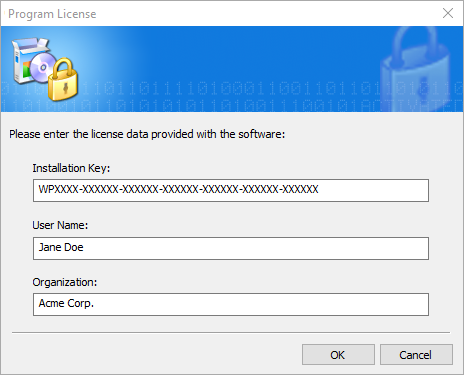
When IRT Cronista starts for the first time, enter the Installation Key, your name, and the name of the organization that owns the license.
Activation
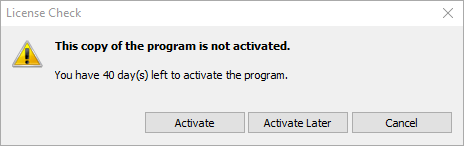
Activate the program before using it.
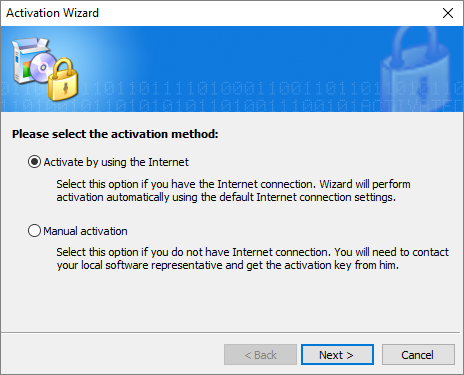
For online activation, select Activate by using the Internet.
IRT Cronista connects to the activation server and activates the license.
Manual activation
If the computer is offline, select Manual activation. You need an Internet-connected smartphone and a camera application that can scan QR codes.
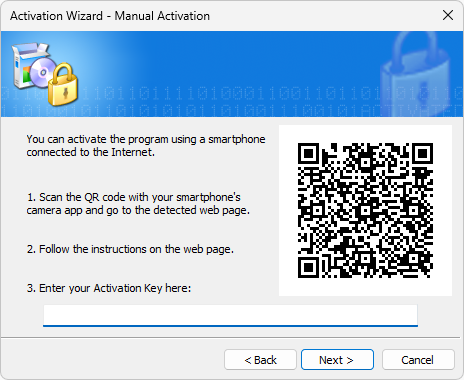
Scan the QR code with the smartphone camera. The link opens the activation page and generates an Activation Key. Enter the key in the corresponding field in the Activation Wizard.
Note: Generating an Activation Key activates the license and counts the computer as activated, even if you do not enter the key. |
Activation with help from your software provider
If neither activation method works, contact your software provider. Leave the Activation Key field blank, and then select Next. The next page displays an Installation Id that support can use to locate the license and generate an Activation Key.
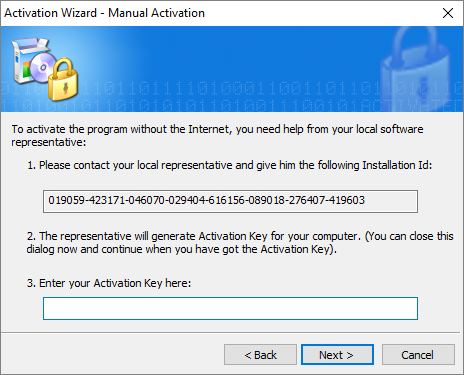
Send the Installation Id to your software provider. This identifier is a unique signature of the computer that is linked to the license and used to generate an Activation Key.
Close the Activation Wizard. When you receive an Activation Key, restart IRT Cronista and enter or paste the key in the Activation Wizard. Select Next to complete activation.