Availability: Ultimate edition
Super-resolution combines several radiometric frames of the same scene, captured with small offsets, to create an infrared image with twice the source width and height. The result can show finer spatial detail than a single source frame, but it does not improve the camera's temperature measurement accuracy.
IRT Cronista can enhance supported multi-frame camera files or use nearby frames from an infrared sequence. Its super-resolution algorithm uses up to eight available frames.
Multi-frame camera files
Some infrared cameras store several slightly offset frames in one file. IRT Cronista identifies files that contain these frames with the following symbol:
For some supported camera files, IRT Cronista opens a high-resolution result produced with the camera manufacturer's processing method. Check the image dimensions in its properties to determine whether the image has already been enhanced.
Enhance multi-frame files
Use the IRT Cronista super-resolution algorithm when a marked file has not already been enhanced, or when you want to create an alternative result. The command is available for files that display the  symbol.
Switch to Organizer mode.
Select one or more marked infrared images.
Select Tools > Enhance Resolution ....
You can also right-click one of the selected images and select Enhance Resolution .... IRT Cronista processes each selected file that contains super-resolution frames.
The program saves each result in the source folder with _HighRes appended to the source file name. The result is a radiometric infrared image; the source file is not changed.
Note: You can also apply the IRT Cronista algorithm to a file that already contains a manufacturer-generated high-resolution result. The program creates a separate _HighRes file and does not replace the result stored in the source file. |
Enhance a frame from an infrared sequence
A recorded infrared sequence can provide the source frames when a camera cannot create a multi-frame file. Use a sequence of a stationary scene recorded with slight camera movement. The sequence must contain at least seven frames.
Open the sequence in the Sequence Player. For general playback instructions, see Playing thermal video.
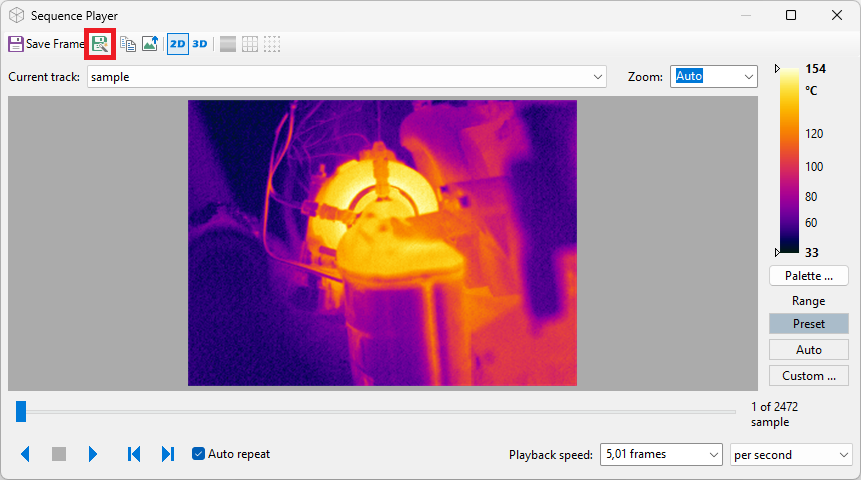
Use the slider to select the reference frame.
Select Save Super Resolution Frame on the toolbar.
IRT Cronista uses up to eight sequence frames around the selected frame. It saves the resulting radiometric image in the sequence file's folder with _HighRes appended to the exported frame name.
Existing results: Running resolution enhancement again for the same source uses the same output name and replaces the existing high-resolution result. |