Link a visual image to its corresponding infrared image to keep the two views of the same subject together. IRT Cronista displays and handles the linked images as one item.
When a report template includes both infrared and visual images, the linked visual image is used with its corresponding infrared image. The template determines where the images appear in the report.
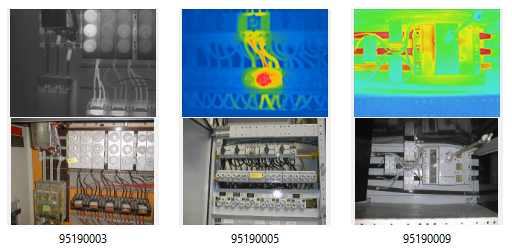
In Thumbnails view, the infrared image appears above its linked visual image:
Automatic linking
IRT Cronista automatically links compatible infrared and visual images in the same folder when they have the same base file name and different extensions. The base file name is the name without its extension.
Manual linking
If images are not linked automatically, use IRT Cronista to link them in Organizer mode by copy and paste or drag and drop. Check that each visual image corresponds to the infrared image. If a pair is incorrect, unlink it before linking the correct images.
Linked images may remain separate files or be stored together, depending on the infrared image format.
See the following topics for instructions and file-format details:
§Linking images by copy and paste