Use automatic hot and cold spots to identify temperature extremes in an infrared image. You can mark the single hottest point immediately or search for several hot or cold points using distance and temperature criteria.
Mark the hottest point
Select Hottest Spot from the spot-tool submenu, the Analysis menu, or the focused image's context menu. IRT Cronista places an automatic spot at the highest-temperature pixel in the focused image.
Find several hot or cold spots
To find hot or cold spots: 1.Select Hot/Cold Spots ... from the spot-tool submenu, the Analysis menu, or the focused image's context menu. 2.Under Look for, select Hot spots or Cold spots. 3.Enter the required number in Spots number:. 4.For two or more spots, enter their minimum separation in pixels in Minimum distance:. 5.To restrict the search to a temperature interval, select Enable under Temperature range. 6.If enabled, enter the lower and upper temperature limits in Min / Max:. 7.To apply the search to every image in the current folder, select the Process all images check box. 8.Click Find. 9.Click Close. |
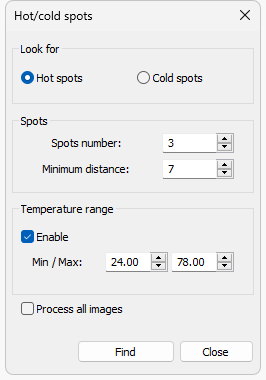
If Process all images is cleared, the search applies only to the focused image.
Note: The search can return fewer spots than requested if the temperature range or minimum distance excludes other suitable pixels. Each search replaces existing automatically located spots of the selected type in the processed image or images. Regular spots and automatically located spots of the other type remain unchanged. |
Clear automatic hot or cold spots
1.Open the Hot/cold spots dialog. 2.Select the type of spot to remove. 3.Enter 0 in Spots number:. 4.To clear that type from every image in the current folder, select the Process all images check box. 5.Click Clear. |
The Find button changes to Clear when Spots number: is 0.
Identify automatic spots
An exclamation point in the spot name identifies an automatically located spot. Hot-spot names use uppercase letters, and cold-spot names use lowercase letters. In the following example, A!, B! and C! are hot spots, and d! is a cold spot.
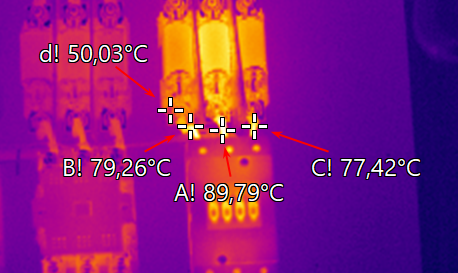
Note: The measurement position of an automatically located spot cannot be moved manually. |
For information about placing and managing regular spots, see Spot measurements.