Use the spot tool  to measure the temperature at a point in an infrared image. You can place spots manually or locate temperature extremes automatically.
Measure a point temperature
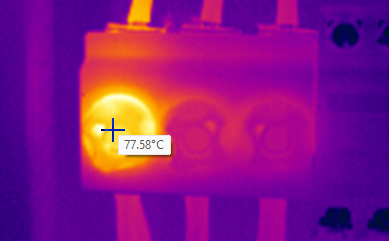
To place a spot: 1.Select Spot 2.Move the pointer over the focused image to view the temperature at the pointer position. 3.Click the point to measure. |
Over the image, the pointer changes to  . The spot label displays the measured temperature.
Locate temperature extremes
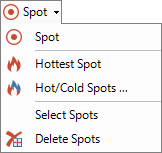
Use Hottest Spot or Hot/Cold Spots ... in the spot-tool submenu to locate one or more temperature extremes automatically.
For details, see Finding hot and cold spots.
Select or delete all spots
Open the spot-tool submenu and select Select Spots to select all regular and automatically located hot or cold spots in the focused image. Select Delete Spots to remove them.
For more information about selecting and editing measurement objects, see Selection tool.